Email is one of the most important tools any small business uses. It helps you communicate with customers, send invoices, share documents, manage enquiries, and keep daily operations running smoothly. However, email is also one of the most common ways cybercriminals try to gain access to business systems and sensitive information.
The good news is that improving your email security does not have to be difficult or expensive. In most cases, a few smart changes can greatly reduce the risk of fraud, data loss, and account compromise.
In this guide, we will share practical and effective email security tips for small businesses, so you can better protect your team, your customers, and your reputation.
Why email security matters for small businesses
Many small businesses believe cybercriminals only target large companies. In reality, smaller businesses are often seen as easier targets because they may have fewer protections in place.
A hacked or compromised email account can lead to serious problems, including:
- Stolen customer or company data
- Fake payment requests sent to clients
- Loss of access to business systems
- Malware infections
- Reputational damage
- Financial loss
Because email is often connected to other systems, such as domain management, website logins, and cloud storage, one weak account can quickly create wider security issues.
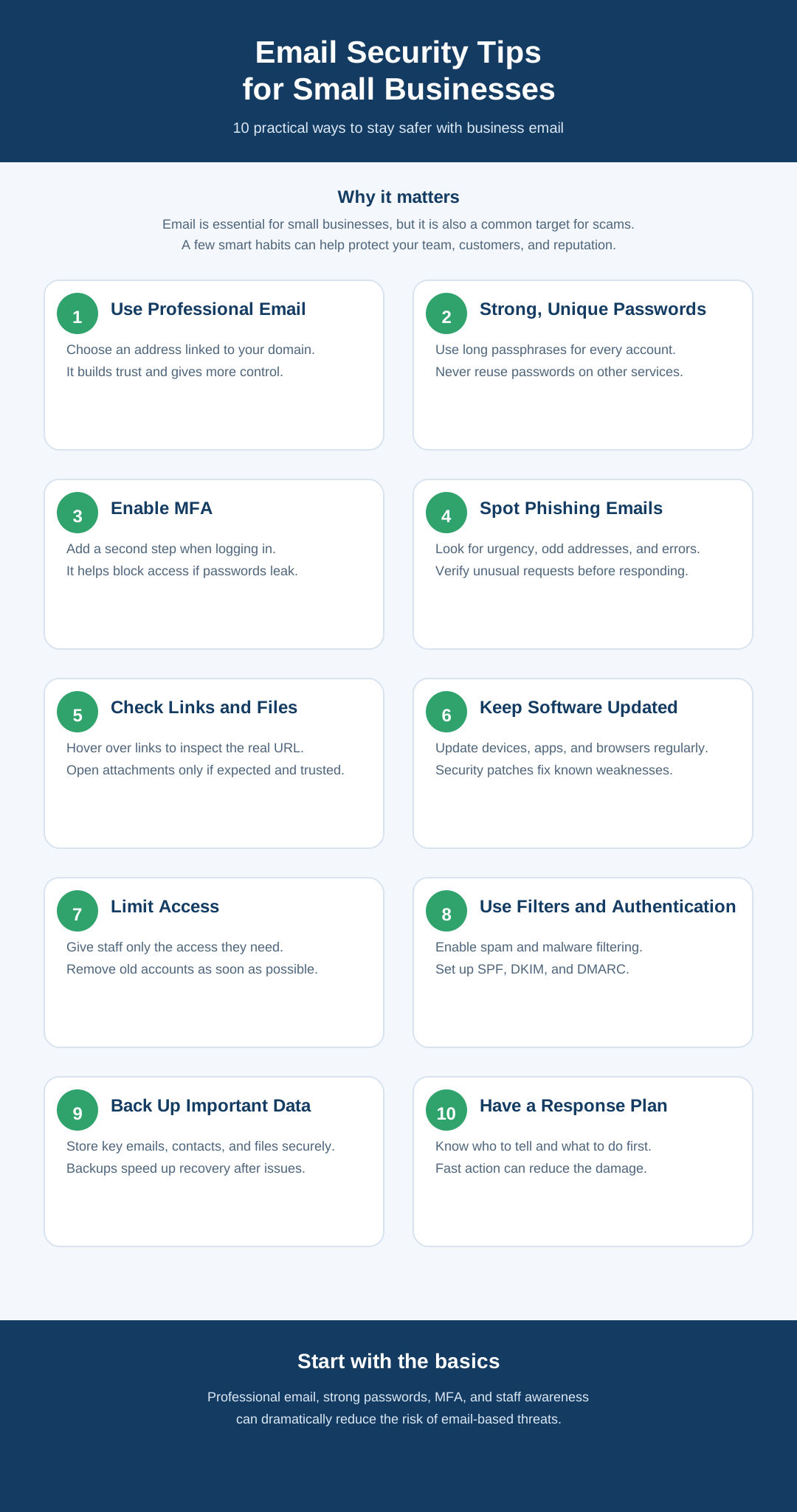
1. Use a professional business email address
One of the best places to start is with a professional email account linked to your own domain, such as you@yourbusiness.co.uk, rather than using a free personal address.
A professional email service usually offers better security controls, more reliable support, and improved account management. It also makes it easier to create separate accounts for staff and remove access when needed.
As well as helping your business look more credible, professional email gives you more control over your communication and security.
2. Create strong and unique passwords
Weak passwords remain one of the most common reasons email accounts get breached.
Every email account should have a password that is:
- Long and hard to guess
- Unique to that account
- Not reused on other websites or apps
- Updated if there is any sign it has been exposed
A strong password is often a passphrase made up of several unrelated words, along with numbers or symbols. Avoid using obvious choices such as your company name, birthday, or simple combinations like Password123.
Using a password manager is a practical way to generate and securely store strong passwords for your team.
3. Enable multi-factor authentication
If you are looking for the single most effective way to improve email security, this is it.
Multi-factor authentication, often called MFA, adds a second step to the login process. This could be a code from an authentication app, a text message, or a login confirmation on a mobile device.
This means that even if someone steals a password, they still cannot easily access the account.
For small businesses, enabling MFA on every email account is one of the simplest and most powerful security measures you can take.
4. Train staff to recognise phishing emails
Phishing emails are designed to trick people into clicking malicious links, downloading harmful files, or sharing confidential information such as passwords or bank details.
These emails can look very convincing. They may appear to come from:
- Banks
- Suppliers
- Delivery companies
- Government departments
- Clients
- Senior members of your own business
Teach your team to watch for warning signs, including:
- Urgent or threatening language
- Unexpected requests for payment or login details
- Unusual sender addresses
- Poor grammar or spelling
- Links that lead to unfamiliar websites
- Attachments that were not expected
A good habit is to pause before taking action. If an email feels unusual, verify it another way before responding.
5. Be cautious with links and attachments
Many email attacks start with a single click.
Before clicking a link, hover over it to see the real destination. If the web address looks suspicious, unrelated, or misspelled, do not click it.
Attachments also need care. Be especially cautious if you receive:
- Unexpected files
- Compressed folders such as ZIP files
- Documents asking you to enable macros or editing
- Files from senders you do not recognise
If an email appears to be from a colleague, customer, or supplier but includes an odd request or attachment, contact them directly to check it is genuine.
6. Keep devices and software up to date
Email security is not just about the inbox. The computers and mobile devices used to access email also need to be protected.
Make sure all devices, browsers, operating systems, and email apps are updated regularly. These updates often fix security vulnerabilities that attackers rely on.
It is also sensible to use:
- Antivirus or endpoint protection
- Firewalls
- Secure passwords on devices
- Screen locks for laptops and phones
- Secure Wi-Fi connections
If staff work remotely, encourage them to avoid public Wi-Fi for sensitive tasks unless they are using a secure connection.
7. Limit access to only what is needed
Not everyone in a business needs access to every inbox or shared mailbox.
It is good practice to give staff access only to the email accounts and folders they need for their role. This reduces the risk of accidental mistakes and limits the impact if one account becomes compromised.
It is equally important to remove or disable email accounts promptly when an employee leaves the business. Forgotten accounts can become a security risk if they remain active unnecessarily.
Review access regularly to make sure it is still appropriate.
8. Use spam filtering and email authentication
A good email service should include spam and malware filtering to help stop dangerous messages from reaching your inbox in the first place.
Small businesses should also consider setting up email authentication methods such as:
- SPF
- DKIM
- DMARC
These help prevent others from sending emails that appear to come from your business domain. They are particularly useful for businesses that send invoices, support emails, or customer updates, as they help protect both your brand and your customers.
While these settings can sound technical, they are an important part of business email security.
9. Back up important emails and prepare for incidents
Even with strong protection in place, no system is perfect. That is why backups matter.
Make sure important business emails, contacts, and documents are backed up securely. If an account is lost, deleted, or compromised, backups can save a huge amount of time and stress.
It is also wise to have a simple plan for dealing with email security incidents. Your team should know:
- Who to report suspicious emails to
- What to do if they click a malicious link
- How to change passwords quickly
- How to alert colleagues or customers if needed
A fast response can make a major difference.
10. Review your email security regularly
Email security should not be treated as a one-off task. Threats change, and businesses evolve over time.
Set aside time every few months to review your email setup and ask:
- Is MFA enabled on all accounts?
- Are passwords strong and unique?
- Have old accounts been removed?
- Is spam filtering working properly?
- Do staff know how to spot phishing emails?
Even a short review every quarter can help you identify weaknesses before they become serious problems.
Final thoughts
Email is essential for small businesses, but it can also be one of the biggest security risks if it is not managed properly. The good news is that staying safer with email often comes down to a handful of practical steps: using professional email accounts, enabling multi-factor authentication, training staff, using strong passwords, and staying cautious with suspicious messages.
By improving your email security, you are not just protecting inboxes. You are protecting your customer relationships, your reputation, and your business as a whole.
If your business is reviewing its email setup, now is a good time to make sure your email service is secure, professionally managed, and supported with the right tools.